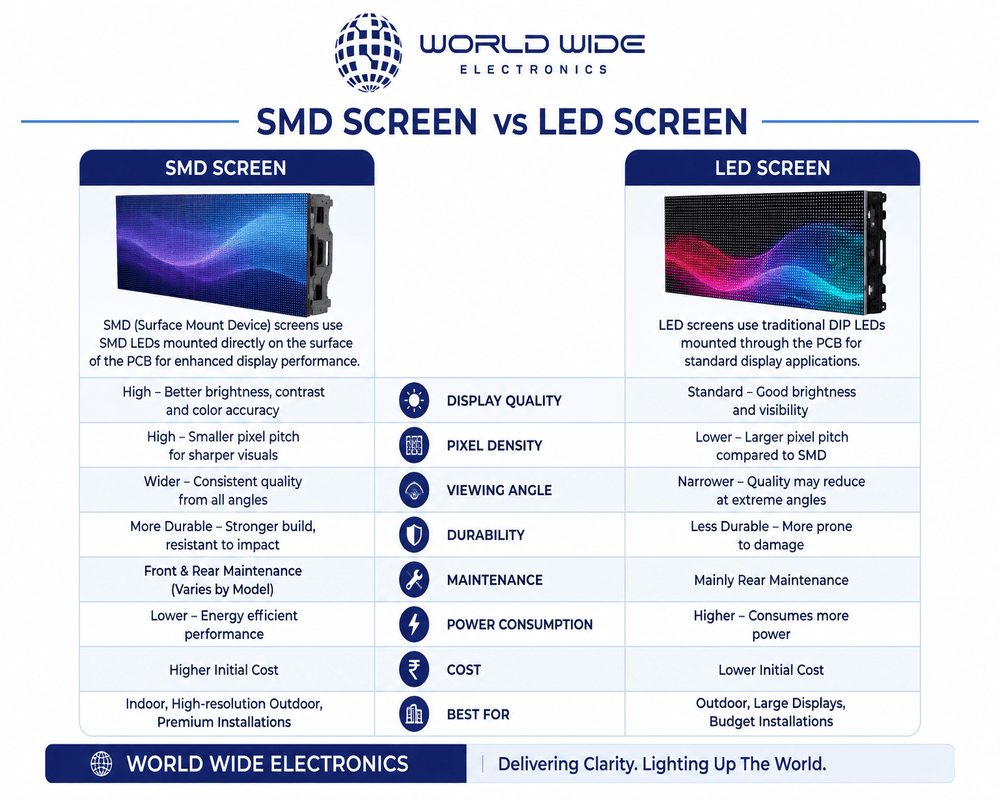
Quick answer: The LED screen lifespan is often many years, but the figure needs a definition. Manufacturers usually quote it as the number of hours until brightness falls to a set share of the original level, commonly 70 percent. Running hours, brightness setting, heat, dust, humidity and power quality decide how close a screen gets to that number. Before you buy, check the rated hours, the test conditions behind them and the warranty terms. Lifespan also depends on the LED type, which our COB vs SMD screen guide compares.
When buyers ask how long a screen will last, they usually mean one of three things: how long until it stops working, how long until it looks too dim for the job, or how long until the colours change. These are different problems with different causes. This guide, from Absen SMD screens and other LED displays we supply in Pakistan, explains each one, shows what the rated hours mean in real years and lists the habits that make a screen last longer.
What “Lifespan” Means for an LED Screen
An LED does not usually fail all at once. It gets dimmer over time. Because of this, the lifespan figure on a spec sheet is normally a brightness target, not a switch-off point. The most common terms are:
- L70: the time until brightness falls to 70 percent of the starting level. This is the figure most often quoted for display LEDs.
- L50: the time until brightness falls to 50 percent. This is a longer figure and is used less often.
- Failure rate: the share of LEDs or modules that stop working within a set period. This is a separate measure and is often covered by the warranty instead of the spec sheet.
A screen rated at 100,000 hours to L70 has not stopped working after 100,000 hours. It is expected to still deliver about 70 percent of its original brightness at that point. Always ask under which current, temperature and brightness the figure was measured, because the same LED can last much longer or much shorter depending on those conditions.
Rated Hours in Real Years
Rated hours are easier to understand when you convert them into years of use. The table below divides the rated hours by the hours the screen runs each day, with no days off. These numbers are simple arithmetic from the rated figure. They are not a guarantee, because real conditions are rarely ideal.
| Rated hours (to L70) | 8 hours a day | 12 hours a day | 24 hours a day |
|---|---|---|---|
| 50,000 hours | about 17 years | about 11 years | about 5.7 years |
| 100,000 hours | about 34 years | about 23 years | about 11.4 years |
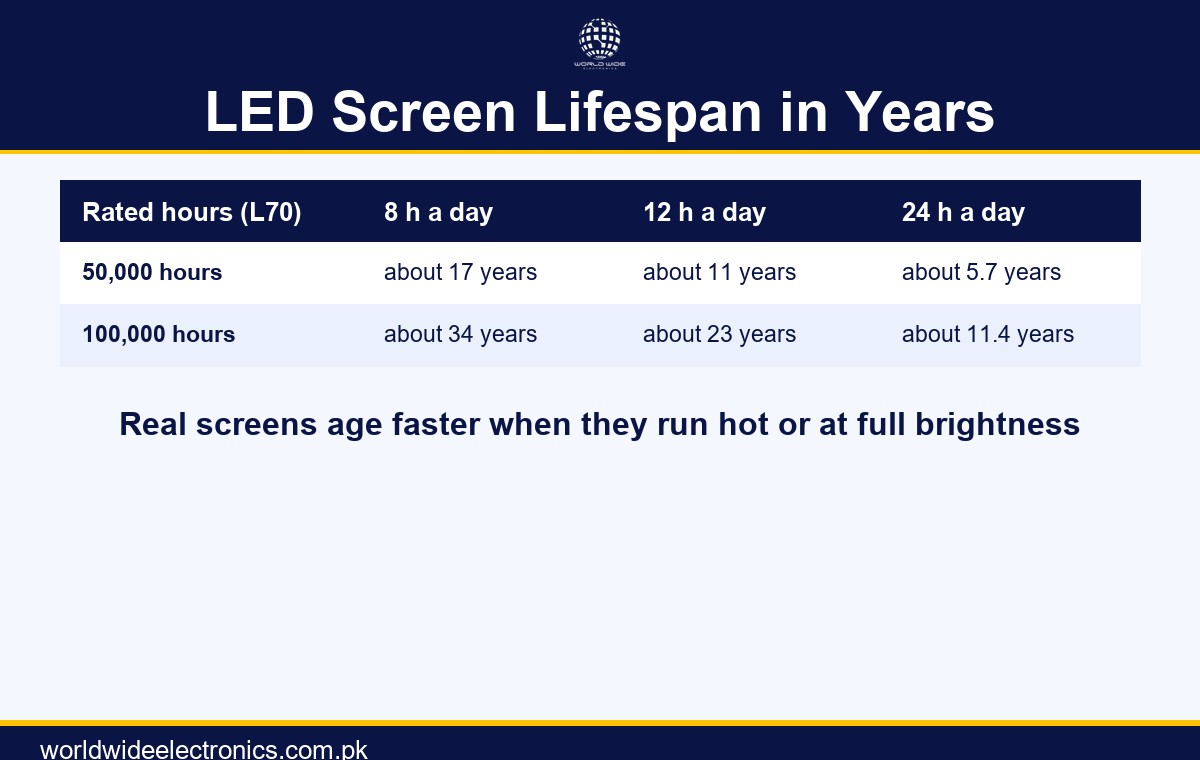
The table shows why the duty cycle matters. A screen in a shop window that runs 12 hours a day ages much more slowly than one that runs around the clock on a highway or in a control room. A stadium screen that is only lit for matches may last far longer than its daily running hours suggest. Think about your own schedule before you compare two spec sheets.
Why Brightness Drops Over Time
Brightness loss is normal. LED chips slowly lose efficiency as they run, and the loss is gradual. Three things make it happen faster:
- Running at full brightness: an LED driven hard produces more heat and ages faster than one driven at a lower level.
- High temperature: heat speeds up ageing. A screen in a hot, closed room or an enclosed outdoor cabinet ages faster than one with good airflow.
- Different colour channels: red, green and blue LEDs do not age at the same rate. When one colour fades faster, the picture shifts, often towards a warm or pinkish tint over time.
Brightness and colour are usually adjusted in the controller software. Recalibration can hide some of the change, but it cannot undo the ageing of the LEDs themselves. Once a screen needs much higher settings to look the same, it is closer to the end of its useful brightness.
Factors That Shorten Screen Life
A screen’s real lifespan depends mainly on its operating environment and how it is run. The most common causes of early ageing are:
- Heat: blocked vents, a sealed cabinet without airflow, direct sun on the back of an outdoor screen, or a hot ceiling void. Keep the ventilation path clear and check the operating temperature at the cabinet.
- Brightness setting: a screen set to maximum brightness all day uses more energy and ages faster than one set to the level the room or street actually needs.
- Dust and dirt: dust blocks vents and filters, which traps heat. Dirty surfaces also make the screen look dim, so people turn the brightness up.
- Humidity and water: moisture can damage electronics and drivers. Outdoor screens need the right protection rating for the site. Our IP65 guide explains what the rating covers.
- Power quality: unstable voltage and overloaded power supplies stress the drivers. A supply running at the edge of its rating is more likely to fail early. Our power supply guide explains how to size and read a unit.
- Loose connections and vibration: a loose cable or connector can cause flicker, heat and repeated stress on the board. Check connections during routine service.
Most of these causes can be controlled after installation. Good ventilation, sensible brightness settings and regular cleaning cost very little compared with a module replacement, and they protect the warranty position as well.
Indoor and Outdoor Screens Age Differently
Indoor screens work in a controlled environment. The air is usually cleaner, the temperature changes less and the screen is not exposed to rain. For this reason, indoor screens often last longer in practice, provided they are not overdriven.
Outdoor screens face sun, rain, dust, wind and wide temperature swings. The brightness needed for daylight also means they run at higher settings than indoor screens. This is why outdoor screens need the right protection rating, good sealing and proper ventilation. A screen that is well matched to its site can last many years. A screen that is badly matched can show early faults within a short time. When you compare brands for a commercial project, our page on Absen LED displays in Pakistan is a useful starting point.
How to Extend the Life of Your Screen
Owners can do a lot to extend the working life of a screen, even without technical training. Focus on these habits:
- Set brightness to the real need. Use the lowest level that works for the room or street. Use automatic brightness where the controller supports it.
- Schedule off hours. If the screen does not need to run overnight, switch it off or dim it during those hours.
- Keep vents and filters clean. Check them on a regular schedule and clean them carefully with the power off.
- Watch the temperature. If a cabinet feels very hot, improve airflow before the heat causes damage.
- Check the power supply. Look at the indicator lights and listen for unusual noise. Fix mains problems rather than living with them.
- Keep spare modules from the same batch. A spare from the same batch matches the colour and brightness of the rest of the screen. This keeps the picture even when a module has to be replaced.
For a wider list of threats to a screen, read 7 Things That Can Damage Your SMD Screen.
How to Check a Lifespan Claim Before You Buy
Lifespan claims are only useful when you know what they were measured under. Before you accept a figure, ask your supplier for the following:
- The rated hours and the brightness level they refer to, for example L70 or L50.
- The test conditions, including the temperature and how the LEDs were driven.
- The warranty length and what it covers, including LED modules, power supplies and labour.
- Spare module availability, so that a future repair does not mean buying a new screen.
- Service support, including who visits the site and how fast a fault is handled.
A supplier who can answer these questions clearly is easier to trust over the life of the screen. Our guide to SMD screen warranty lists more questions to ask before you order.
Signs a Screen Is Nearing the End of Its Life
A screen does not need to be replaced the moment it ages. Watch for these signs and plan a repair or upgrade before the problems become expensive:
- Brightness is clearly lower than when the screen was new, and the settings are near the maximum.
- Colour has shifted, and recalibration no longer makes the picture look even.
- Dark modules or dead pixels are increasing in number from one month to the next.
- Brightness is uneven, with some cabinets clearly dimmer than others.
- The power supplies fail more often, or they run hot during normal use.
- The screen can no longer be read in daylight, even at full brightness.
When the screen is still mostly good, replacing a few modules with same-batch spares is often the best answer. When the brightness loss is across the whole screen, compare the cost of a refurbishment with the cost of a new screen, and ask for a written quote for each option.
Related guides: IP65 Rating Explained: How to Choose a Weatherproof Outdoor LED Screen and SMD Screen Power Consumption: Electricity Use, UPS and Solar Backup.
Frequently asked questions
How many years does an LED screen last?
It depends on the rated hours, the daily running time and the environment. A screen rated at 100,000 hours to L70 that runs 12 hours a day could last more than 20 years in theory, but real screens often show clear dimming much sooner if they run hot or at full brightness. Ask for the rating conditions and plan for service.
Does running an LED screen all day shorten its life?
Yes, running hours are a major factor. A screen that runs 24 hours a day accumulates far more hours than one used during business hours. Reducing brightness and switching off when the screen is not needed both help to slow ageing.
Can a dim LED screen be made brighter again?
Software settings can raise the output a little, but they cannot restore LEDs that have aged. Raising the brightness also speeds up ageing. The better fix is to clean the screen and vents, check the power supply and, if the loss is real, replace the affected modules with same-batch spares.
Why does my screen look yellowish or pink after a few years?
Red, green and blue LEDs age at different rates, so the balance of colours shifts over time. Recalibration can reduce the effect, but it cannot fully correct LEDs that have aged. A technician can check the colour balance and advise whether module replacement is needed.