Quick answer: A DMX lighting controller sends instructions to stage lights, telling each fixture which colour, brightness, movement and effect to show. The standard most event lighting uses is called DMX512. It carries 512 channels on one cable run, called a universe, and every fixture is given a start address so it listens to the right channels. Event organisers do not need to programme a console, but knowing the basics of channels, universes and addresses helps you read a lighting plan, check the kit before the day and avoid fixtures that do not respond.
Event lighting suppliers often talk about DMX without explaining it. This guide, from the team behind our professional event lighting services in Pakistan, explains the DMX basics in plain language. It covers what a DMX controller does, how channels and addresses work, the difference between a lighting console and a software controller, the cabling and wireless options, and what to check before a show.
What a DMX Lighting Controller Does
A DMX lighting controller is the device, or the software, that tells the lights what to do. The operator uses faders, buttons or a screen to set the colour, brightness, pan and tilt, gobo pattern and strobe speed for each light. The controller turns those settings into a stream of data and sends it along a single cable, one fixture after another. Each fixture reads only the channels meant for it and ignores the rest.
DMX is short for Digital Multiplex. The version used for stage lighting is DMX512, which is the same standard the industry has used for many years. Because it is a common standard, a controller from one brand can usually drive fixtures from another, although the channel list for each fixture must be set up correctly.
Channels, Universes and Addresses
Three words appear in almost every DMX plan, and they are simple once you see how they fit together:
- Channel: one value that controls one thing on a fixture, such as red brightness, pan angle or strobe speed. Each channel takes a value from 0 to 255.
- Universe: one set of 512 channels. Most small and medium events use one universe. Larger shows can use several.
- Address: the number, from 1 to 512, where a fixture starts listening within the universe. A fixture then uses the channels that follow its start address.
Two fixtures must not share the same channels. If a PAR light is set to address 1 and uses 8 channels, and a moving head is also set to address 5, both will react to the same values and the show will look wrong. This is the most common cause of a fixture that moves or changes colour when it should not.
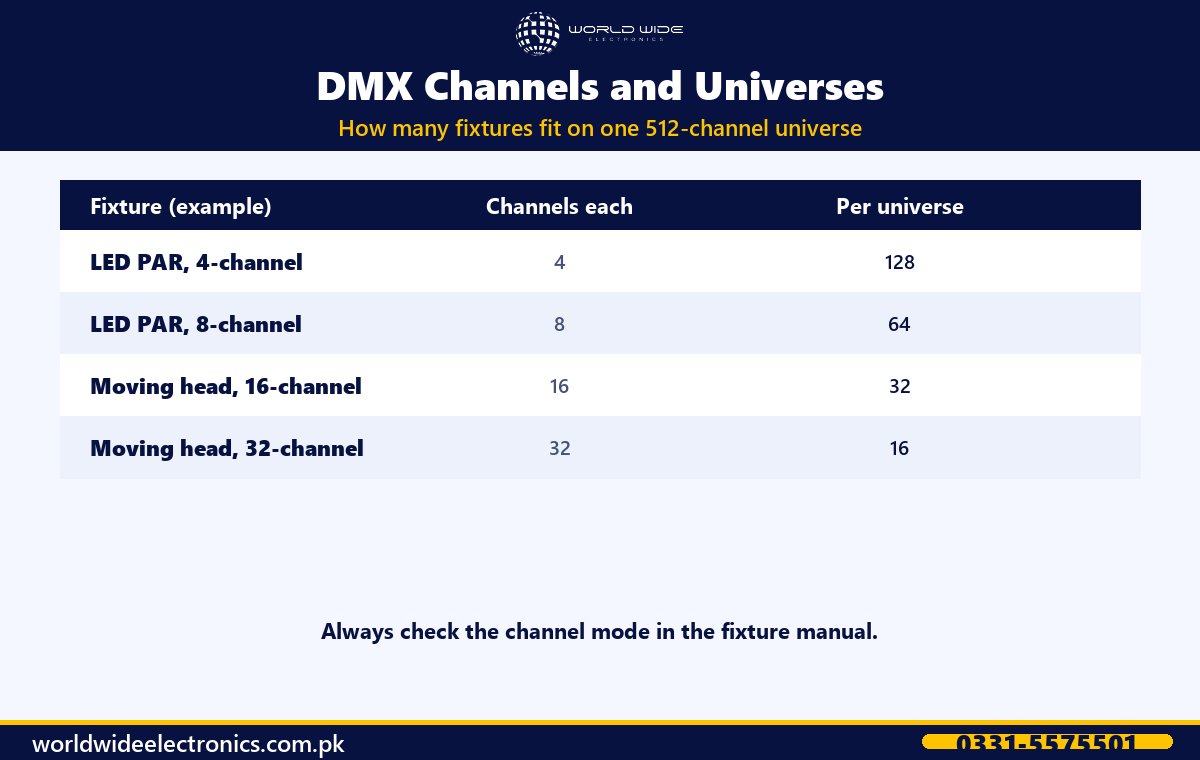
The number of fixtures that fit in one universe depends on how many channels each one uses. The table below shows the arithmetic for a few common fixture types. The exact figure depends on the mode you set on the fixture, so always check the manual.
| Fixture type (example) | Channels used per fixture | Fixtures that fit in one universe |
|---|---|---|
| Simple LED PAR, 4-channel mode | 4 | 128 |
| LED PAR, 8-channel mode | 8 | 64 |
| Moving head, 16-channel mode | 16 | 32 |
| Moving head, 32-channel mode | 32 | 16 |
A moving head in a high channel mode gives more control, with separate channels for fine pan and tilt, colour wheels and effects. A lower channel mode is easier to set up but offers fewer options. Ask your supplier which mode they plan to use before the event, because the mode decides how many fixtures fit on one run.
Lighting Consoles vs Software Controllers
There are two common ways to run a DMX show:
- Lighting console: a dedicated desk with physical faders, buttons and a built-in screen. It is reliable, quick to use during a live show, and designed for the stage environment. Consoles cost more than laptop setups and are normally run by an experienced operator.
- Software controller: a program on a laptop, connected to the fixtures through a USB-to-DMX interface. It is cheaper to start with and suits smaller events and pre-programmed shows. It needs a stable laptop and a backup plan, because a crash during a show will stop the lights.
For a wedding or a small conference, a software controller or a simple desk is often enough. For a concert, a corporate awards night or a show with many moving heads, a full console and an experienced operator give more control and a safer back-up route.
Cabling and Signal Basics
A wired DMX run uses a shielded twisted pair cable, usually with XLR connectors. Three-pin and five-pin XLR connectors are both common, so check which one your fixtures use before you order cables. Adapters exist, but they add another connection point that can fail.
A few rules keep the signal clean:
- Daisy chain the fixtures: connect them one after another in a line, not as a star with many branches from one point. Branches need a DMX splitter or an amplifier.
- Use a terminator: fit a terminator plug to the last fixture in the line. This reduces signal reflections, which can cause flicker or random behaviour, especially on longer runs.
- Keep cables away from power: run DMX cable separately from mains power cables where possible, to reduce interference.
- Check the number of fixtures per line: each signal line has a limit set by the equipment. Use an amplifier or a splitter when the line grows beyond the limit in the product specification.
Good cable management is a safety issue as well as a signal issue. Tape or cable ties keep cables off walkways, and cable covers protect them where people walk. Our guide to planning a high-tech event in Pakistan covers the wider equipment planning that goes around the lights.
Wireless DMX
Wireless DMX sends the same signal by radio, without cable runs. It saves time on a large stage, a temporary structure or an outdoor event where cabling is hard to route. It is most useful for a few fixtures in a space where cables would be a trip hazard or are difficult to fit.
Wireless systems have their own limits. Range depends on the equipment, the building materials and the number of other radio devices nearby, such as wireless microphones and in-ear monitors. Many organisers use wireless DMX as a supplement to a wired backbone rather than as the only link. Test the system at the venue before the event and keep a wired back-up if the show depends on it.
Network Protocols: Art-Net and sACN
Larger shows often send DMX over an Ethernet network instead of a DMX cable. Two common protocols are Art-Net and sACN. Both carry many DMX universes across one network, which suits big venues and shows with many fixtures. The network needs proper switches, cable quality and IP address planning, so these setups are usually handled by an experienced technician. Ask your supplier whether the venue needs a network-based system before you plan the show.
A Simple Lighting Rig Setup
For a small stage, the setup process follows a clear order. This sequence reduces mistakes on the day:
- List every fixture, its mode and the number of channels it uses.
- Assign start addresses so that no two fixtures overlap. Leave a small gap between groups to make later changes easier.
- Connect the fixtures in a daisy chain from the controller, and fit the terminator at the end.
- Power up one fixture at a time and check that it responds to each channel.
- Save the setup as a patch file, so it can be restored quickly after a fault or a change of venue.
- Run the full show at the venue, with the audience area lit, before the event.
A patch sheet, which lists each fixture with its name, address and mode, is one of the most useful documents for the whole event. It helps the technician, the operator and the event organiser agree on the same plan.
Common Mistakes to Avoid
- Overlapping addresses: two fixtures on the same channels move or change colour together.
- No terminator: long runs flicker or behave in unexpected ways.
- Star wiring: branching from one point without a splitter causes signal problems.
- Wrong fixture mode: a fixture set to the wrong mode ignores some channels or responds to the wrong ones.
- No back-up: a single laptop or a single cable with no spare can stop the whole show.
What to Ask Your Lighting Supplier
When you request a quote for a show that uses DMX control, ask these questions. The answers show whether the supplier understands the plan and can support it on the day:
- What controller will run the show, and who will operate it?
- How many universes will be used, and how many fixtures are on each one?
- Which fixture mode is set, and does it leave room for the effects you want?
- Is the cabling wired or wireless, and where are the terminators and splitters?
- What is the back-up plan if the controller or a cable fails?
- Will the patch sheet be shared before the event?
A clear answer to each question shows that the supplier has planned the show, not just listed the fixtures. For a larger event, the lighting design should also link to the stage and sound plan. Our guide to how many watts a sound system needs for an event covers the audio side of the same stage.
Related guides: Sound and Lighting Services in Pakistan, Stage Lighting Types Explained, and LED controllers for LED screens, which covers the separate controllers used for LED display screens.
Frequently asked questions
What is a DMX lighting controller?
A DMX lighting controller is a console or a software program that sends control signals to stage lights using the DMX512 standard. It sets the colour, brightness, movement and effects for each fixture, and the fixtures respond to the channels they are assigned.
What is the difference between a channel and a universe?
A channel is a single value that controls one feature of a fixture, such as brightness or pan. A universe is a set of 512 channels on one DMX line. Fixtures are assigned start addresses within a universe, and each fixture uses a block of channels from its address onward.
Can I run DMX lights without a console?
Yes. A software controller on a laptop, connected through a USB-to-DMX interface, can run a show without a dedicated console. This suits smaller events and pre-programmed shows. For a complex live show, a console is usually easier to operate under pressure.
Why does one of my lights react to another light’s settings?
This usually means two fixtures share the same channels, because their start addresses overlap. Check the patch sheet, change one start address so the channel blocks do not overlap, and test each fixture again.
Is wireless DMX reliable for a live event?
Wireless DMX works well for a small number of fixtures in a suitable space, but range and interference depend on the venue. Test it on site before the event, and keep a wired back-up for any show that cannot afford a dropout.