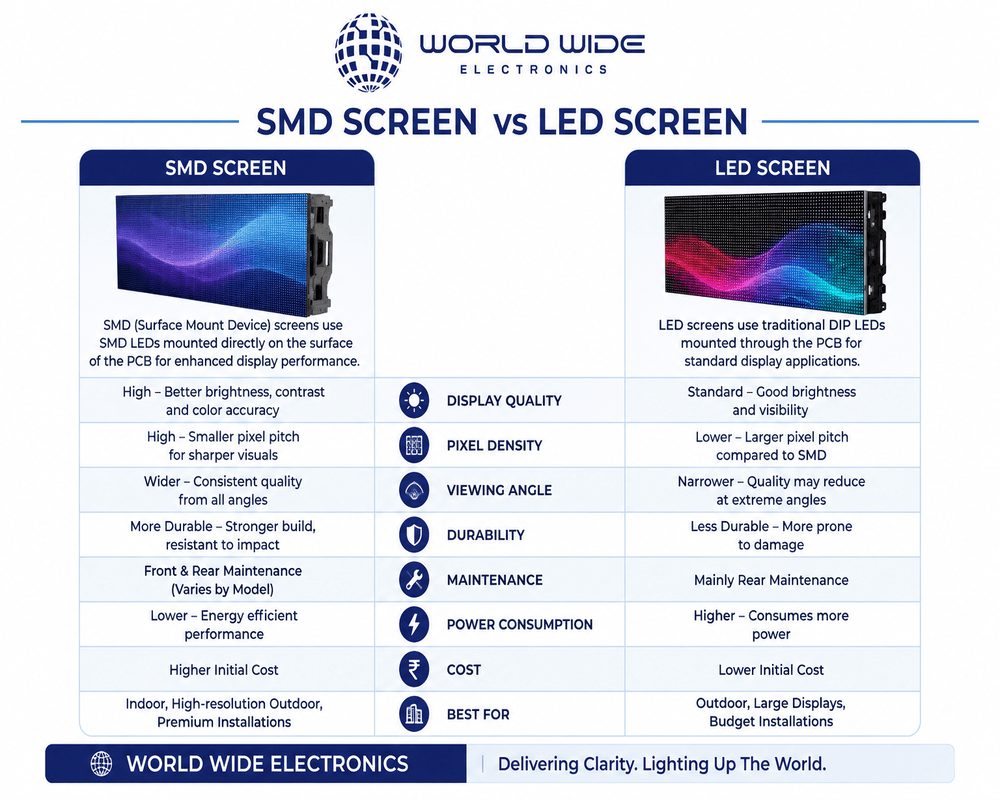
You already know these technologies exist. Now comes the harder part — figuring out which option is right for your specific situation, budget, and goals. This guide breaks down the key decisions so you can compare confidently before you invest.
- Indoor vs outdoor SMD screens — which do you need?
- How to choose the right sound system for your venue
- Interactive touch panels: business vs education use
- 5 things to check before buying any electronics
- Common mistakes buyers make
Indoor vs Outdoor SMD Screens Which Do You Actually Need?
This is the most common question buyers ask — and the answer depends on where the screen will be used and what it needs to withstand.
| Feature | Indoor SMD Screen | Outdoor SMD Screen |
|---|---|---|
| Brightness | 800–2,000 nits | 5,000–10,000 nits |
| Weather resistance | Not required | IP65+ rated |
| Pixel pitch | P1.5 – P3 (finer detail) | P4 – P10 (wider viewing) |
| Ideal for | Malls, offices, events | Billboards, stadiums, roads |
| Cost | Lower | Higher |
Rule of thumb: if your screen will face direct sunlight at any point during the day, you need an outdoor-rated display with at least 5,000 nits of brightness. Indoor screens will wash out completely in sunlight.
How to Choose the Right Sound System for Your Venue
Sound system requirements vary dramatically depending on the size and type of space. A system that works perfectly for a 200-person conference room will completely underperform at an open-air concert.
| Venue Type | Recommended Setup | Key Requirement |
|---|---|---|
| Small meeting room (20–50 people) | 2 passive speakers + mixer | Low feedback, clear voice |
| Conference hall (100–300 people) | Line array system | Even sound distribution |
| Outdoor event / concert | Professional PA with subwoofers | High SPL, weather-resistant |
| Wedding / banquet hall | Wireless system + DJ setup | Flexibility, no cable clutter |
Interactive Touch Panels: Business vs Education
Touch panels serve different purposes depending on who’s using them. Here’s how the requirements differ:
| Corporate / Business | Schools / Education | |
|---|---|---|
| Screen size | 65″ – 75″ | 75″ – 86″ |
| Key feature | Video conferencing, annotation | Multi-touch, lesson software |
| Durability needed | Moderate | High (student use) |
| OS preference | Windows / Android | Android (simpler interface) |
5 Things to Check Before Buying Any Electronics
1 After-sales support
Can the supplier provide installation, warranty, and on-site repair? In Pakistan, this matters more than the initial price.
2 Pixel pitch for screens
The smaller the pixel pitch number (e.g. P2 vs P6), the sharper the image at close range. Match it to your viewing distance.
3 Power consumption
Large LED screens and audio systems can draw significant power. Always ask for power ratings and factor in electricity costs.
4 Compatibility with existing systems
Will the new screen or sound system work with your current content sources, cables, or control systems?
5 IP rating for outdoor use
Any electronics used outdoors need an IP65 or higher rating to withstand dust and water exposure in Pakistan’s climate.
Common Mistakes Buyers Make
- Buying an indoor screen for outdoor use — it will fail within weeks in direct sunlight
- Choosing a sound system based on wattage alone — coverage area and speaker placement matter far more
- Ignoring pixel pitch — a P8 screen looks great from 15 meters but blurry up close
- Skipping professional installation — improper setup causes most early failures
- Always ask for a demo or site visit before finalising a large purchase
- Request case studies or references from similar projects in your city
- Confirm warranty terms in writing before signing any agreement
Quick Questions Answered
Real-World Use Cases (So You Can Decide Faster)
Understanding specs is one thing — seeing how they apply in real situations makes decision-making much easier. Here are common use cases in Pakistan and what actually works best:
Retail Stores & Shopping Malls
Indoor SMD screens with P2–P3 pixel pitch are ideal. Customers stand close, so clarity matters more than extreme brightness. Pair this with a moderate sound system for announcements or promotions.
Roadside Advertising & Billboards
Outdoor SMD screens with P6–P10 pixel pitch and 5,000+ nits brightness are essential. These are viewed from a distance, so ultra-fine resolution isn’t necessary — durability and visibility are.
Corporate Offices & Meeting Rooms
Interactive touch panels (65”–75”) with video conferencing integration work best. Add a compact audio setup for clear communication during meetings.
Wedding Events & Concerts
Temporary setups using rental outdoor SMD screens, truss systems, and high-power PA systems with subwoofers are the standard. Flexibility and quick installation matter most here.
Budget Planning — What Should You Expect?
One mistake many buyers make is focusing only on the screen price and ignoring the full system cost.
Here’s what your budget should include:
- SMD Screen Cost (per square meter)
Indoor screens are cheaper than outdoor, but prices vary based on pixel pitch. - Installation & Structure
Wall mounting, truss systems, or custom frames add to cost. - Sound System (if required)
From basic setups to professional PA systems. - Content Control System
Sending cards, processors, or software to manage display content. - Maintenance & Warranty
Always factor in long-term service costs.
Pro Tip: A slightly higher upfront investment in quality equipment often saves you from frequent repairs and replacements.
How to Choose the Right Supplier in Pakistan
Not all suppliers offer the same level of quality or service. Before you finalize, make sure they provide:
- On-site inspection before quotation
- Proper installation team (not freelancers)
- Warranty + after-sales support
- Portfolio of completed projects
- Availability of spare parts
If a supplier only talks about price and avoids technical details, that’s a red flag.
Final Buying Checklist (Quick Recap)
Before you make a decision, confirm:
Indoor vs Outdoor requirement clearly defined
Correct pixel pitch based on viewing distance
Brightness level suitable for lighting conditions
Sound system matched to venue size
Installation included in the package
Warranty and service terms confirmed
Power requirements understood
Supplier credibility verified
Final Thoughts
Buying electronics like SMD screens, sound systems, or touch panels isn’t just about choosing a product it’s about choosing the right solution for your environment and goals.
A well-planned setup can:
- Boost your brand visibility
- Improve customer engagement
- Enhance event experiences
- Deliver long-term ROI
A poorly chosen setup, on the other hand, leads to wasted budget and constant issues.
Ready to Make the Right Choice?
If you’re still unsure, the smartest move is to get expert advice based on your exact needs.
Get a free consultation today and let professionals guide you toward the best setup for your space, budget, and business goals.