Quick answer: In an interactive flat panel vs projector comparison, the room light matters most. An interactive flat panel is usually the better choice for a modern classroom. It is a large display with built-in touch and writing, so teachers do not need a separate projector, screen and whiteboard. It stays readable with the room lights on, and it has no lamp to replace. A projector is a lower-cost option for a room that can be darkened, and it can throw a large image onto a wall. The choice depends on the room light, the teaching style and the total cost over several years.
Schools that plan a classroom upgrade often ask whether to buy an interactive flat panel or keep the projector they already have. This guide, written by the team behind our interactive touch panels work in Pakistan, compares the two options in plain language. It covers the picture, touch and writing, daily use, upkeep, running costs and the questions to ask a supplier before you order.
What an Interactive Flat Panel Is
An interactive flat panel is a large display with a touch layer on the front, sold in sizes chosen for a classroom. A teacher can write, draw, move objects and open files directly on the screen. Most panels run their own software, connect to a laptop by cable or wireless link, and can show a web page without a separate computer. The panel replaces the projector, the screen and often the whiteboard in one unit.
The key benefit is the picture itself. The panel is a display, so the image is sharp, the colours are steady and the room lights can stay on. Students at the back of the room can read small text without the teacher closing the blinds.
What a Projector Setup Involves
A projector setup usually has three parts: the projector, a projection screen or a clean white wall, and a whiteboard or a board for writing. Some schools use a touch overlay or a pen-tracking device to make the projector interactive, but this adds parts that need calibration and care. The projector throws the image from a fixed position, so the picture depends on the throw distance, the room shape and the placement of the unit.
The projector can produce a large image for a small cost, and it suits a hall or a long room where the teacher needs to show a picture to many students. It works best in a room that can be darkened, and where the teacher does not stand in the beam.
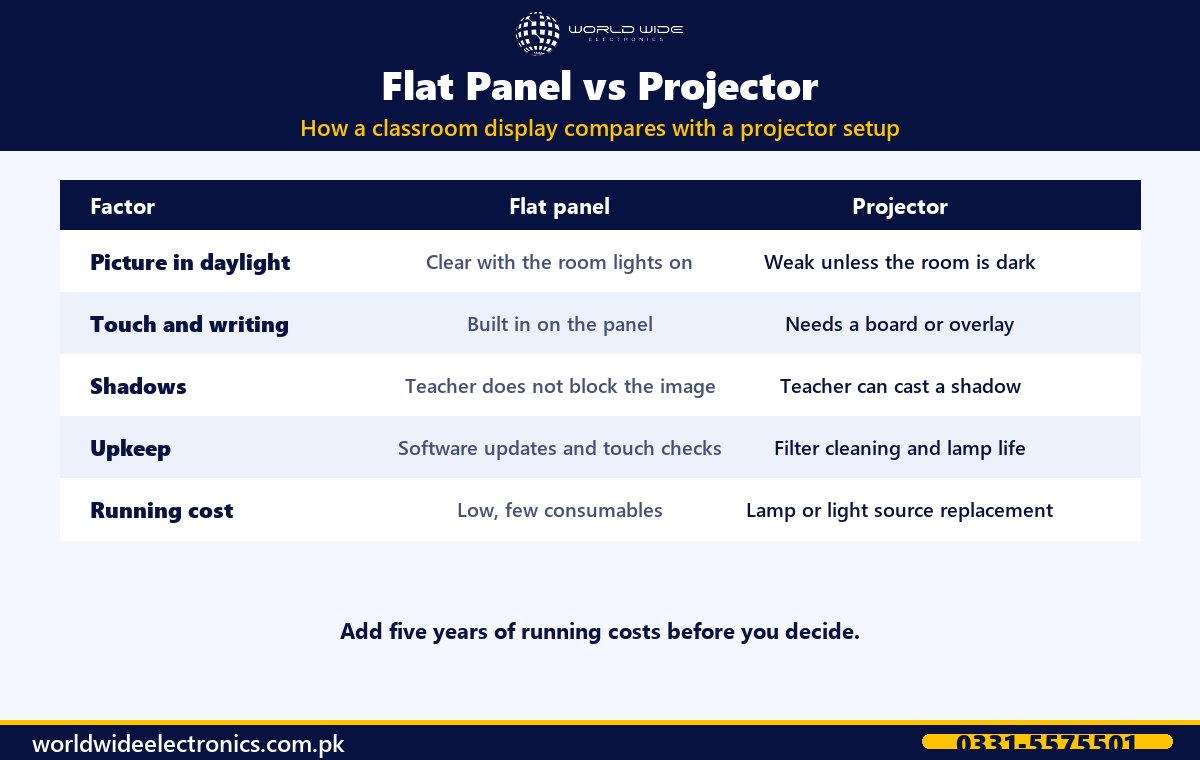
| Factor | Interactive flat panel | Projector setup |
|---|---|---|
| Picture in daylight | Clear with the room lights on | Weak picture unless the room is dark |
| Touch and writing | Built in, with the pen or finger on the screen | Needs a board, an overlay or an extra device |
| Shadows | None, the teacher does not block the picture | Teacher can cast a shadow in the beam |
| Upkeep | Software updates, screen cleaning, touch checks | Filter cleaning, lamp or light source life, alignment |
| Running cost | Low, with no consumables to replace | Higher over time, with lamp or light source replacement |
| Upfront cost | Higher for a single unit | Lower per unit if the room is already set up |
Picture Quality in a Lit Classroom
Most Pakistani classrooms are lit by tube lights or ceiling lights, and many have windows. Under these conditions a projector image looks faded, and teachers spend time closing blinds or switching off lights. A flat panel does not have this problem, because it produces its own light. Check the brightness rating on the spec sheet before you buy, and ask the supplier to show the panel in a room similar to yours.
Glare from windows still matters. Place the panel so that the screen does not face a bright window, and use blinds on the sunny side of the room. A good layout reduces glare for both the panel and the projector.
Touch, Writing and Daily Teaching
The biggest difference is how the teacher works. Classroom technology is used differently when the teacher can write on the display itself, and a smart board for classroom use does this in one unit. With a flat panel, the teacher can write, underline, draw a diagram and drag an image on the same surface, and the notes can be saved for the next class. With a projector and board, the teacher often switches between the computer and the board, which slows the lesson. Touch panel features vary by model, so check the touch points, the pen support and the software before you buy. An interactive display for school use should also let a teacher save notes and share them with the class.
Ask for a demonstration with your own teachers. A panel that feels smooth in the showroom may feel slow in a real lesson if the software is hard to use. The best test is a short lesson, taught by a teacher who will use the panel every day.
Upkeep and Running Costs
A projector has parts that wear out. The lamp or light source has a fixed life, the filter needs cleaning, and the image must be realigned after the unit is moved. A flat panel has fewer parts that wear, but it needs software updates, a clean front surface and a regular check of the touch layer. Both options need a simple maintenance plan, and both need a local contact who can respond when a fault happens.
When you compare costs, add the lamp or light source replacement, the cost of a board or overlay and the time lost in a lesson when the picture fails. Over several years, these items can change the answer. Ask the supplier for a simple five-year cost sheet that shows the parts you would replace.
When a Projector Still Makes Sense
A projector is still a good choice in some cases. A large hall or a long room may need a very large image that a single flat panel cannot match at a sensible cost. A room that is already darkened for other uses, and that has a working projector, may not need an immediate change. A school with a tight budget may choose a projector for a few rooms and a flat panel for the rooms used most. The decision should follow the way the room is used, not only the price on the quote.
Common Mistakes to Avoid
- Buying a panel that is too small: check the size against the back row of the classroom.
- Ignoring the room light: a panel with low brightness will look weak near a bright window.
- Skipping the software test: the panel is used through its software, so test it with your teachers.
- Forgetting the wall mount and power: these must be planned with the panel, not added later.
- Judging only the first price: lamp replacement, board costs and downtime change the total cost.
Questions to Ask Your Supplier
Before you sign, ask the supplier to answer these questions in writing:
- What is the brightness rating, and how does the picture look in a room with the lights on?
- How many touch points does the panel support, and does the pen work smoothly for writing?
- What software comes with the panel, and can teachers save and share their lessons?
- What is the warranty, and how quickly is a faulty part replaced?
- Who installs the wall mount and the power, and who trains the teachers?
- What is the five-year running cost, including any parts that need replacing?
Related guides: SMD LED Screen for Conference Rooms and How Corporate Offices Use SMD Screens.
Frequently asked questions
Is an interactive flat panel better than a projector for a classroom?
For most classrooms that are used every day with the lights on, an interactive flat panel is the better choice. It gives a clear picture without darkening the room, and it has built-in touch and writing. A projector can still suit a darkened room or a very large image.
Does an interactive flat panel need a separate whiteboard?
No. The panel is the writing surface, so the teacher does not need a separate board for most lessons. Some schools keep a board for other uses, but the panel covers the main teaching tasks.
How long does a projector last compared with a flat panel?
A projector’s lamp or light source has a fixed life, and the replacement cost comes back over time. A flat panel has no lamp to replace in the same way, but it needs software updates and a check of the touch layer. Ask the supplier for the rated life of each part in writing.
Can teachers use an interactive flat panel without training?
Basic use is simple, but teachers get the most from the panel after a short training session. Ask the supplier to train the teachers on the software, the pen, the saving of lessons and the daily checks before the panel is used in class.