A good LED screen for wedding stage setup does more than fill the space behind the couple. It lets guests at the back of the hall see the rituals, the entry and the family moments as clearly as the front row. If you plan to book an LED screen on rent for weddings, a few early decisions decide how the stage looks on the day: size, position, content and setup time.
This guide covers each one in plain steps. You will find a size table to start from, a content plan for each function and a simple booking timeline.
| Quick answer
For most banquet halls in Pakistan, a stage screen between 16 × 9 ft and 20 × 10 ft with a P2.9 to P3.9 pixel pitch works well. Small halls can use around 10 × 6 ft. Lawns and marquees with 800 or more guests need bigger screens, often with side screens. The final size depends on stage width, ceiling height and how far the last guest sits from the stage. |
Why Use a Wedding Stage Backdrop Screen
A printed backdrop stays the same from the first guest to the last. A wedding stage backdrop screen can change with every function. Here is what it gives you:
- One stage, many looks. Floral motion for the mehndi, a royal design for the nikah and a clean white loop for the walima.
- Names and monograms. The couple’s names and the date stay readable from every table.
- A better view for the back rows. Close-up shots of the couple during rituals.
- Photos and videos. Pre-wedding shoots, family clips and slideshows play on the same screen.
- Easy changes. A new design is a new file, not a new printed banner.
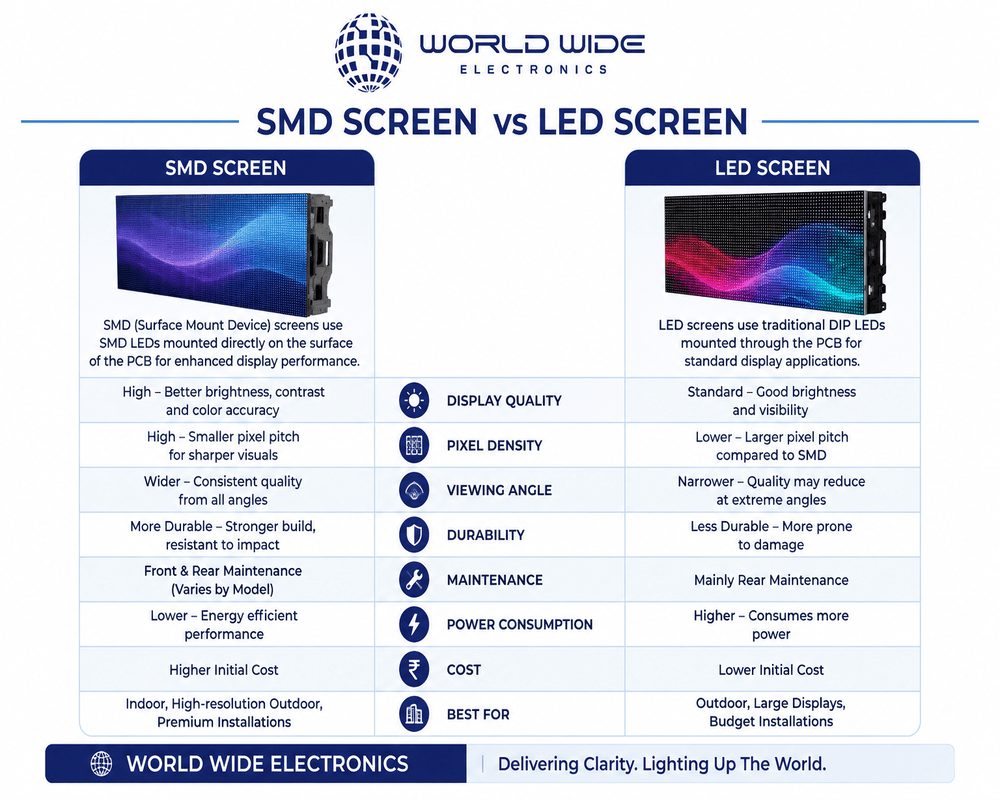
Indoor screens suit banquet halls and covered marquees. Open lawns in daylight need an outdoor screen with higher brightness. If you want the technical details behind this choice, read our guide to SMD Screen for Events in Pakistan.
Wedding Screen Size: How to Choose the Right One
Size is the first question most families ask. Four things decide the answer:
- Stage width. The screen should not be wider than the stage. Leave space for decor on both sides.
- Ceiling height. Measure from the stage floor to the lowest light, truss or chandelier. The screen has to fit below it with some room to spare.
- Distance to the last guest. A longer hall needs a bigger screen, or side screens.
- A 16:9 screen matches most videos and camera feeds, so nothing is cropped or stretched.
Pixel pitch in simple words
Pixel pitch is the gap between two LED dots, measured in millimetres. You will see it written as P2.5, P3.9 or P4. A smaller number gives a sharper picture and lets guests sit closer.
As a rough rule, the pitch in millimetres is about the closest comfortable viewing distance in metres. A P3 screen looks best when guests are around 3 metres or more away. Indoor weddings usually use P2.5 to P3.9. Open-air functions use outdoor panels in the P4 to P6 range.
Wedding screen size guide
| Venue | Guests | Suggested screen size | Pixel pitch |
| Home or small hall | Up to 150 | 10 × 6 ft to 12 × 7 ft | P2.5 to P3 |
| Medium banquet hall | 150 to 400 | 16 × 9 ft to 20 × 10 ft | P2.9 to P3.9 |
| Large banquet hall | 400 to 800 | 20 × 10 ft to 24 × 12 ft, plus side screens in a long hall | P3.9 |
| Lawn or open-air marquee | 800 and above | 24 × 12 ft or larger, with side screens | P4 to P6 (outdoor) |
These sizes are a starting point, not a fixed rule. Stage width, ceiling height and decor change the final number. Venue photos or a site visit help confirm it.
Where to Place the Screen on the Stage
- Centre backdrop. Behind the couple’s seating, in the middle of the stage. This is the most common layout.
- Side screens. One on each side in a long hall or lawn, so guests seated at an angle still get a clear view.
- Keep the bottom edge high enough that sofas, flowers and decor in front do not block the picture. Agree the height with your decorator before the day.
- Point stage lights away from the screen face. Direct light washes out the colours.
- Camera test. If a videographer will film the stage, test the screen on camera first. Correct control settings and a good refresh rate keep flicker out of the footage.
Mehndi and Baraat Screen: What to Show at Each Function
Each function has its own mood, so the content should change too. A mehndi and baraat screen works best when the files are planned in advance and shared with the screen team early.
| Function | What to show | Tip |
| Mehndi | Bright animated backgrounds, couple names, dance clips, photo slideshow | Use bold colours and large text |
| Baraat | Entry visuals, groom’s name, live feed of the arrival, family photos | Add a live camera so the back rows can see the entry |
| Nikah | Soft background, names, date, a slow loop | Avoid loud animation and flashing effects |
| Walima | Elegant loop, pre-wedding video, thank-you message | Test video and audio before guests arrive |
Content checklist
- Send videos as MP4 files in 1920 × 1080 (16:9).
- Check the spelling of every name twice, including titles and family names.
- Use high-resolution photos. Blurry pictures look worse when enlarged.
- Keep text short, large and high contrast.
- Keep a backup copy of all files on a USB drive and with the technician.
Live Video on Stage: How It Works
Live video on stage means a camera feeds the screen in real time. Guests at the back see the couple, the rituals and the baraat entry up close. The signal travels in a simple chain:
Camera → Video mixer → LED controller → Screen
- Camera feed. Your videographer or event team provides it. Tell the screen team early if you need a video input such as HDMI.
- Small delay. Some delay between the camera and the screen is normal. Ask your video team to check it during the test.
- A technician switches between the live feed and your pre-made content during the function.
- Standby loop. Keep a backup background ready in case the camera drops for a moment.
The screen is only one part of the setup. Sound, lighting and controllers need to work together. Our guide to Planning a High-Tech Event in Pakistan explains how.
Setup Checklist for an LED Screen for Wedding Stage
Most wedding day problems come from setup, not from the screen itself. Check these points early:
- Confirm the load-in time, entry route and stairs or lift with the hall manager.
- Setup time. Ask for time to install and test before guests arrive. If the hall allows, set up the day before.
- Use a separate, stable power line for the screen. Plan for load shedding and generator switch-over so the screen does not restart during a ceremony.
- Support structure. The screen needs a stable frame or stage truss. Do not hang heavy decor from it.
- Route them away from walkways used by guests and the family.
- Someone should stay for the full function to run and watch the screen.
- Agree an end time with the hall so the team can remove the equipment safely after guests leave.
You can add lighting and a sound system to the same booking, so one team handles the whole stage.
Booking Timeline
The winter wedding season is busy, and good slots go early. This order keeps things simple:
- Fix the date and venue, then check availability. Contact the screen provider as soon as both are confirmed.
- Share venue details. Hall name, stage width, ceiling height, guest count and a few photos.
- Get a size suggestion. Ask for a visualization with the quotation.
- List the functions. Decide which ones need the screen: mehndi, baraat, nikah, walima.
- Send content early. Files should reach the team well before the first function.
- Confirm access. Agree load-in and dismantling times with the venue.
- Test on the day. Check content, live feed and power before guests walk in.
Common Mistakes to Avoid
- Choosing the size by budget alone, then finding the text unreadable from the back rows.
- Using a coarse pixel pitch when tables sit close to the stage.
- Sending photos and videos on the wedding day.
- Using portrait photos without cropping, which leaves black bars on a wide screen.
- Ignoring ceiling height, lights and decor when fixing the size.
- Having no backup power plan.
- Booking late in the season.
Why Plan Your Wedding Screen with World Wide Electronics
World Wide Electronics has supplied LED screens in Pakistan since 1999 and is ISO 9001:2015 certified. Our team works from Karachi and Islamabad. For weddings in other cities, share your venue and dates and we will confirm availability.
Every wedding rental includes:
- Indoor or outdoor LED screen sized for your venue
- Control system to run videos, slides and live camera feeds
- Delivery, installation and dismantling by our technical team
- A technician for live support during the function
- Backup support if anything needs attention
Frequently Asked Questions
What size LED screen is best for a wedding stage?
For a medium banquet hall with 150 to 400 guests, a screen between 16 × 9 ft and 20 × 10 ft is a common choice. Smaller halls can use around 10 × 6 ft. Large halls and lawns need bigger screens, often with side screens.
Should I choose an indoor or outdoor screen for a wedding?
Choose an indoor screen for banquet halls and covered marquees. Choose an outdoor screen for open lawns, where daylight and dust are a concern and higher brightness is needed.
Can the screen show live video of the couple?
Yes. A camera feed goes through the control system to the screen. Your videographer provides the feed, and the technician switches between it and the pre-made content.
Can I use the same screen for mehndi, baraat and walima?
Yes. The same screen can run different designs and videos for each function. Send the content for every function before the first event.
Which pixel pitch is best for a wedding hall?
P2.5 to P3.9 suits most indoor wedding halls. The closer guests sit to the stage, the smaller the pitch should be. Open-air weddings usually use P4 to P6 outdoor panels.
How early should I book a wedding LED screen?
Book as soon as your date and venue are fixed. Slots fill quickly in the wedding season, and early booking leaves time for a site check and content preparation.
Plan Your Wedding Screen Early
The right size, a good position, planned content and a proper setup window are what make a stage screen work. Get these four right and the screen will look like part of the decor, not an add-on.
Ready to plan yours? Send your venue, date and guest count to our team for a free quote. You can see what is included on our page for LED screen on rent for weddings.